v1.0.49 · Linux · Windows · macOS

The free download manager that depends on nothing

Accelerated multi-threaded downloads — and the video or music the page you are on is playing, from YouTube, Vimeo and any site streaming HLS or DASH. No yt-dlp, no ffmpeg, no external binaries: every protocol and container is implemented in the app itself. A free download manager for Windows, Linux and macOS — open source, no ads, no account.

Free and open source · MIT licensed · free forever

Internet Xtreme Downloader
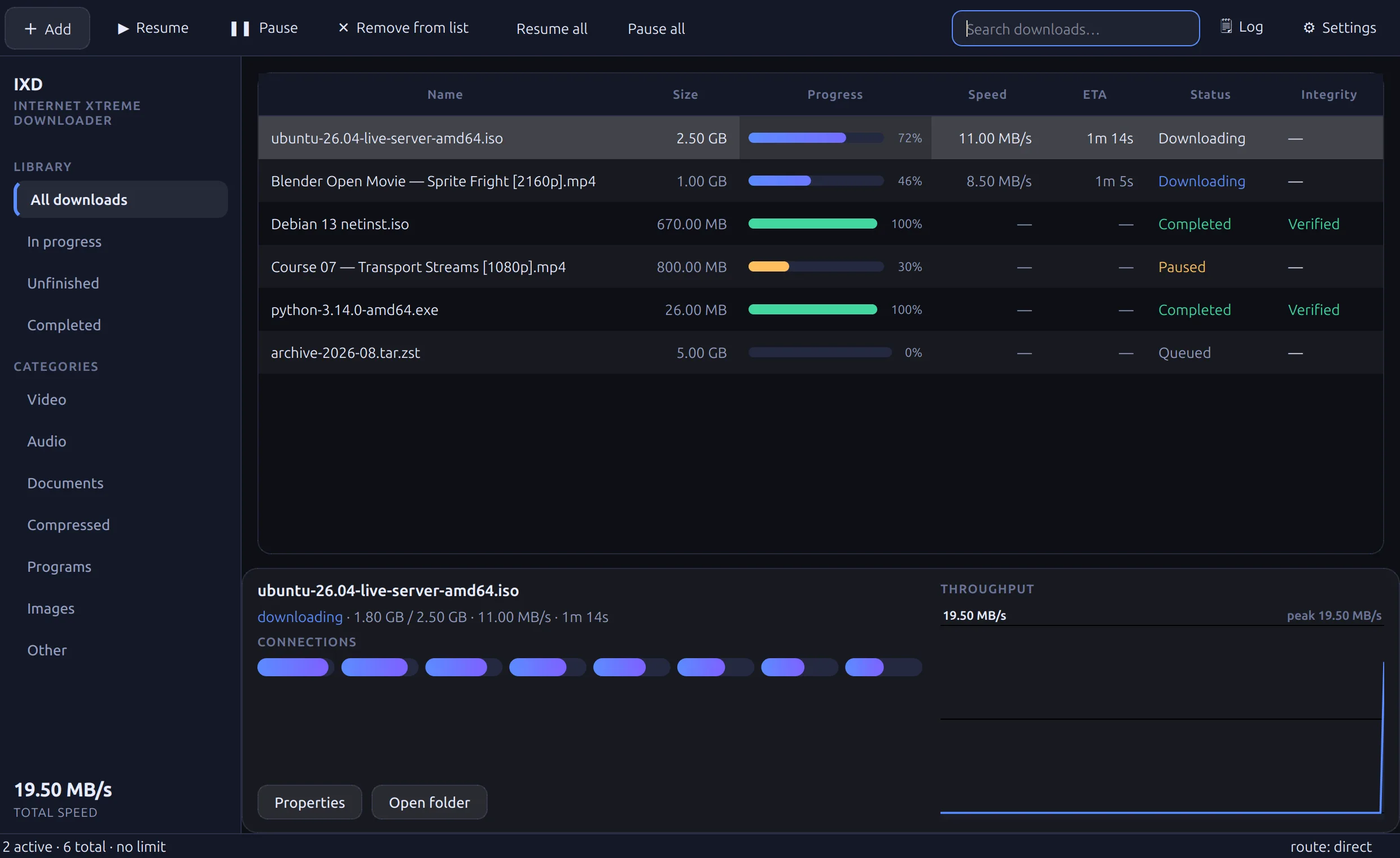
The IXD main window: category sidebar, download list with per-chunk progress, and a live speed graph.
0external binaries
1runtime dependency
9protocols written here
1,163offline assertions

How it works

Four screens, one job

Start it, watch it finish, and know why when it does not.

A page you are watching
The IXD panel on a video page, listing the qualities the site publishes: 1080p, 720p, 480p, 288p and 184p. IXD download list with per-chunk progress bars and a live speed graph. A single IXD transfer, showing its chunks and speed history. IXD network settings: proxies, connection counts and speed limits. IXD general settings.
On the page

Video and music, from wherever you are watching

The extension puts a panel on any page that is playing something and lists the qualities the site itself publishes — YouTube up to 2160p, Vimeo, and any site streaming HLS or DASH. Pick one and it is in the download list; above 1080p the video and audio arrive separately and are combined into one file.

The list

Everything at once, and each chunk of it

Every transfer with its own progress, speed, ETA and integrity state. The bar is not an estimate: it is the chunks, drawn as they fill, so a download that has stalled looks different from one that is slow.

One transfer

Open it and see the connections

Per-connection ranges, the speed history, the server's own digest checked against the file. A connection that finishes early takes work from the busiest one still running, so the end of a download is as parallel as the start.

Network

Routed however you need it

HTTP, HTTPS and SOCKS5 with authentication, the system proxy followed automatically, a rotating pool, and traffic pinned to one interface regardless of the default route. All of it written here — nothing is delegated to curl.

Settings

Quiet by default

Categories, queues, speed limits, schedules and browser integration in one place. It registers the messaging bridge with every browser it finds on its own, so the extension connects the first time it is loaded.

Video and music

Download what the page is playing

The browser extension puts a panel on any page with a player and lists the qualities the site itself publishes. Pick one and it goes straight to the download list — no copying addresses, no pasting into a website that wants your attention first.

YouTube, to 2160p Vimeo HLS · m3u8 DASH · mpd MPEG-TS Audio-only streams Sites nobody wrote support for

Above 1080p, video and audio are published as separate streams. Both are fetched and combined into one playable file — MP4 for H.264 and AAC, Matroska for VP9, AV1 and Opus — by muxers written in this project rather than by ffmpeg. A stream that carries only sound is saved as music, not as a video that will not play.

No external binaries

Nothing here shells out to anything.

No bundled toolchain to keep up to date, nothing an upstream release can break, and one dependency to install.

Written in this repository

Protocols, containers, ciphers

Each line is something most download managers get from somewhere else. Here it is code you can read, in one tree, with one dependency.

This is a beta.
Implemented in IXDUsually a dependency on
HTTP/1.1, SOCKS5, WebSocketcurl
ISOBMFF, Matroska, MPEG-TS muxingffmpeg
YouTube, HLS and DASH extractionyt-dlp
AES-128-CBCcryptography
Debian packagingdpkg-deb
Runtime dependencyPySide6 only

Features

Built for speed, and for finishing

A file is never published unless every byte is accounted for.

Dynamic chunking

A connection that finishes early splits the busiest remaining chunk instead of idling, so the tail of a download stays parallel.

Byte-exact resume

Chunk cursors live in SQLite. Pause, resume, and full recovery after a crash or a dropped connection — from the exact byte.

Completeness guard

Media is checked by its first bytes. A segment answered with an error page or a login wall is refused, not saved as a file that plays nothing.

Native media extraction

YouTube, Vimeo, HLS with AES-128, DASH and a generic page scraper — a plugin registry, not a wrapper around someone else's tool.

Muxing, in both containers

Adaptive video and audio arrive separately and are combined into one playable file — ISOBMFF for H.264+AAC, Matroska for VP9/AV1+Opus.

Browser integration

Chrome and Firefox. The extension registers itself, hands captured downloads to the engine, and gives back anything it cannot deliver.

In-page quality panel

Any page that is playing something gets a panel with the quality list. Drag it anywhere, or close it with the ×. Rendered in a shadow root, so no site's CSS can deform it.

Routing and scheduling

HTTP, HTTPS and SOCKS5 with authentication, the system proxy followed automatically, queues, speed limits and time windows.

Link swapping

An expired token is recognised as expiry, not a permission error. The download parks, takes a fresh URL, and continues on the chunks it has.

Download

Get IXD 1.0.49

Every build is produced by the same scripts, on a clean runner, and the release names the commit it was built from.

On 1.0.24 or 1.0.25 on Windows? Download the installer below and run it over your existing install. Those two cannot update themselves when IXD was installed for everyone on the PC — the installer needs to elevate and could not be started at all — which is the defect 1.0.26 fixes. Your settings and downloads are kept, and updating happens inside the app from then on.

Linux Primary

Developed and used on Linux daily.

  • .deb Debian and Ubuntu
  • .tar.gz portable, any distribution
  • Snap and flatpak browsers supported
Download for Linux

Windows

Portable — unzip and run.

  • .zip x64, no installer
  • Chrome, Edge and Firefox bridge
  • First launch is slow while Windows scans it
Download for Windows

macOS Unverified

Builds and packages; not yet run on real hardware.

  • .dmg Apple silicon
  • Not signed or notarised
  • First launch: right-click → Open
Download for macOS

Browser extension

Three steps

Start IXD once

It registers the messaging bridge with every browser it finds and writes the extension out where the browser can load it.

Open your extensions page

chrome://extensions → Developer mode → Load unpacked. Firefox: about:debugging → Load Temporary Add-on.

Pick the extension folder

Chrome uses extension, Firefox uses extension-firefox beside it — on Linux under ~/.local/share/ixd/, on Windows under %APPDATA%\IXD\. The bridge is already authorised, so it connects immediately.

Questions

Common questions

What people ask before downloading it.

Is IXD free?

Yes. It is free and open source under the MIT licence, with no ads, no account and no paid tier, and it stays that way. The source is on GitHub and the releases are built from it. The code is yours to fork; the name and the logo are protected, so a fork carries its own name — see the trademark policy.

Is this a free download manager, or a trial?

A free download manager, permanently. No trial, no licence key, no premium tier, no upsell. It accelerates downloads by splitting each file across several connections, resumes byte-exactly after a drop, and downloads video and audio from pages that stream them — a free alternative to Internet Download Manager and the other paid download accelerators.

Does it need ffmpeg or yt-dlp?

No. Nothing shells out to an external binary. HTTP, SOCKS5, HLS, DASH, AES-128, MP4, Matroska and MPEG-TS are all implemented inside the application, and the only runtime dependency is PySide6.

Can it download video and music from websites?

Yes. The browser extension puts a panel on any page that is playing something, and it lists the qualities the site actually publishes — YouTube up to 2160p, Vimeo, HLS and DASH, and a generic reader for sites nobody wrote support for. Separate video and audio streams are combined into one playable file, and a stream that carries only sound is saved as music rather than as a video that will not play.

Which systems does it run on?

Linux is the primary platform and is used daily. Windows ships as a portable zip that needs no installer. The macOS build is produced but has not yet been run on real hardware, so treat it as unverified.

How is it different from a browser's own downloader?

A transfer is split across several connections and a connection that finishes early splits the busiest remaining chunk, so the tail of a download stays parallel. Chunk positions live in a database, so a download survives a crash, a reboot or a dropped connection and resumes from the exact byte — and an expired link is recognised as expiry rather than as an error.

Is it finished?

It is a beta, and it says so. Ordinary downloads, HLS, DASH, YouTube and the browser integration are in daily use; the open items are listed in the repository rather than hidden.